 VitaLinks
Guide › Logging meals
Logging meals
There are several ways to write down what you eat. Use whichever is handiest at the time: they all end up in the same place.
1. Type what you ate
It’s the most direct way, and it works in your browser and on your phone.
- Open the Meals tab.
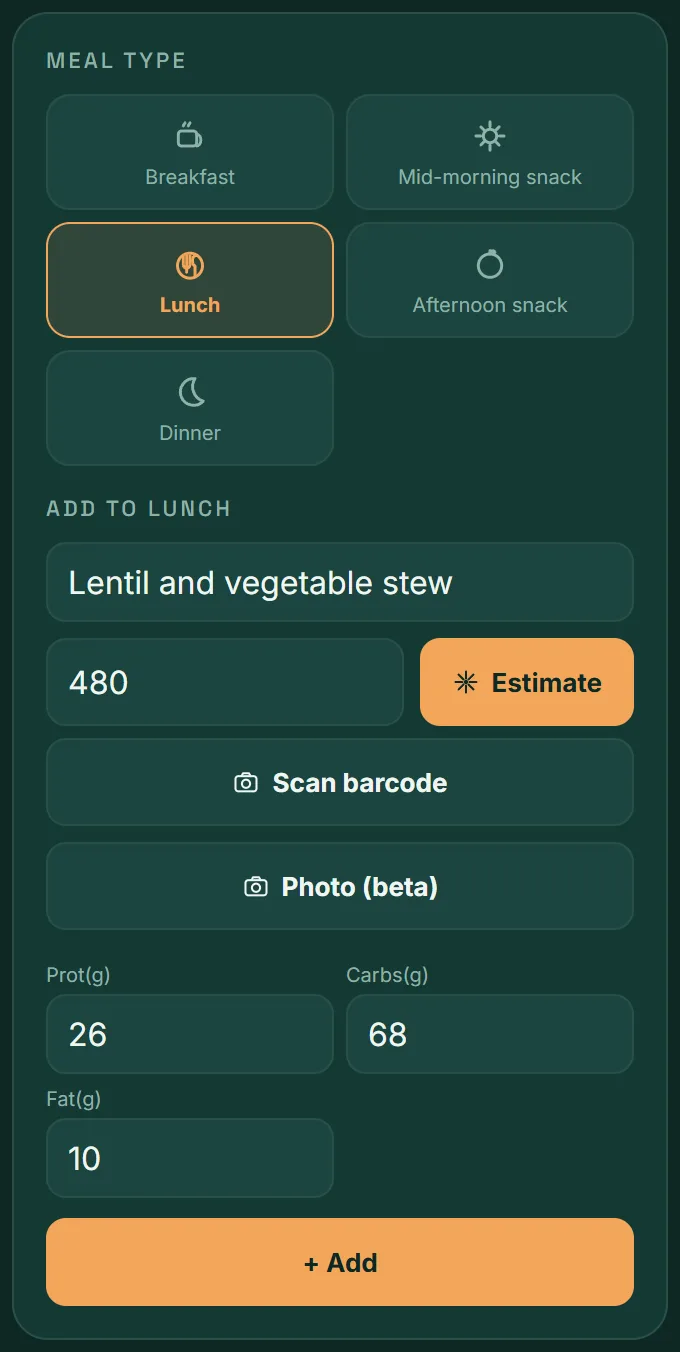
- Choose the meal type: Breakfast, Mid-morning snack, Lunch, Afternoon snack or Dinner.
- Type what you ate, with the amount if you know it: “medium banana”, “6 oz tuna can”, “150 g chicken breast”.
- Enter the calories yourself, or tap Estimate to have the app fill them in.
- Check the calories and the grams of protein, carbs and fat. Change them if they don’t match your plate.
- Tap + Add.
The amount matters. “Rice” and “one cup of cooked rice” give very different results. The more specific the description, the better the estimate.
2. How Estimate works
When you tap Estimate, the app looks for the values in this order and keeps the first one it finds:
- Your history. If you’ve logged that food before, it fills in instantly. As you type, the app suggests the ones it already knows.
- The shared food bank. Foods other people have already estimated in VitaLinks.
- An AI estimate. For anything new. It’s included in VitaLinks Plus (up to 15 estimates a day, in the mobile app); it also works if you add your own Anthropic API key in Settings.
Without Plus or an API key you lose nothing of the logging: type the calories by hand and tap + Add. Next time, that food will already be in your history.
They’re estimates. AI-generated values are approximate and are not medical advice. You review and adjust before saving.
3. Scan a barcode
For packaged products: a yogurt, a snack bar, a can.
- In Meals, tap Scan barcode.
- Allow camera access and point at the code on the packaging.
- The app fills in the product’s name and values, taken from Open Food Facts.
- Adjust the figures to what you ate and tap + Add.
Watch the portion. The values that come in are per 100 g of product. If you ate a 125 g yogurt, multiply by 1.25 before saving.
If the product isn’t in the database, the app tells you and you can type it in by hand.
4. Calories from a photo
Take a photo of your plate and VitaLinks estimates what’s on it and what it adds up to. It’s included in VitaLinks Plus, in the mobile app.
- In Meals, choose the meal type and tap Photo (beta).
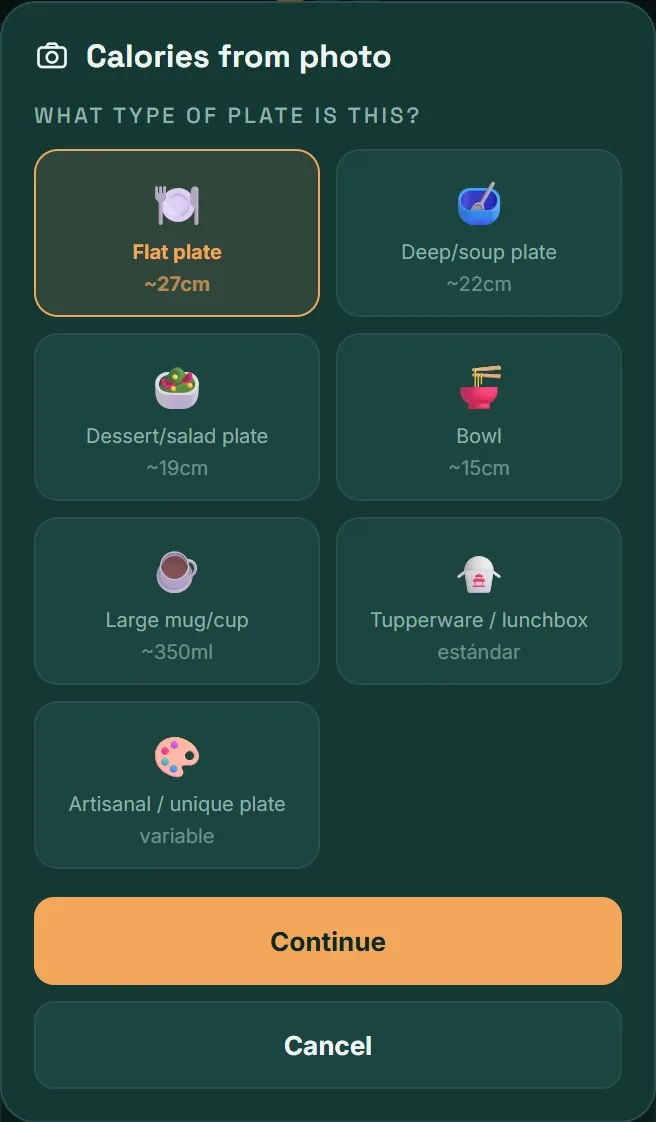
- Say what kind of plate it is (flat, deep, bowl, mug, lunchbox…). Its size gives the app a reference for working out the amounts. Tap Continue.
- Tilt your phone toward the plate until the indicator shows the correct angle, then tap Capture.
- If you like, add a note (“this is a double portion”) and tap Analyze plate.
- Check the list: remove anything extra with the ✕ and add what’s missing under Add undetected food.
- Tap Add to my meals.
Getting a good photo
- Get the whole plate in frame, in good light and without harsh shadows.
- Spread the food out a little if it’s piled up.
- If the plate is an unusual size, choose “Artisanal / unique plate” and leave a fork visible next to the food: it works as a scale reference.
They’re estimates. Calories from a photo are generated by AI: they’re approximate and are not medical advice. Always check the list before saving.
5. Save the dishes you repeat
If you have the same breakfast most days, there’s no need to type it every time.
Personalized meals
- In Meals, tap Create personalized meal.
- Give it a name, for example “My chicken salad”.
- Add its ingredients one by one with + Add component. You can estimate or scan them, just like a regular meal.
- Tap Save personalized meal.
From then on, typing its name in Meals brings it up in the suggestions with a star (★) and fills in the total.
My foods
My foods lists everything you’ve already estimated. If a value doesn’t look right, search for it, tap Edit and correct it: the app will use your version from then on.
6. Review and correct your day
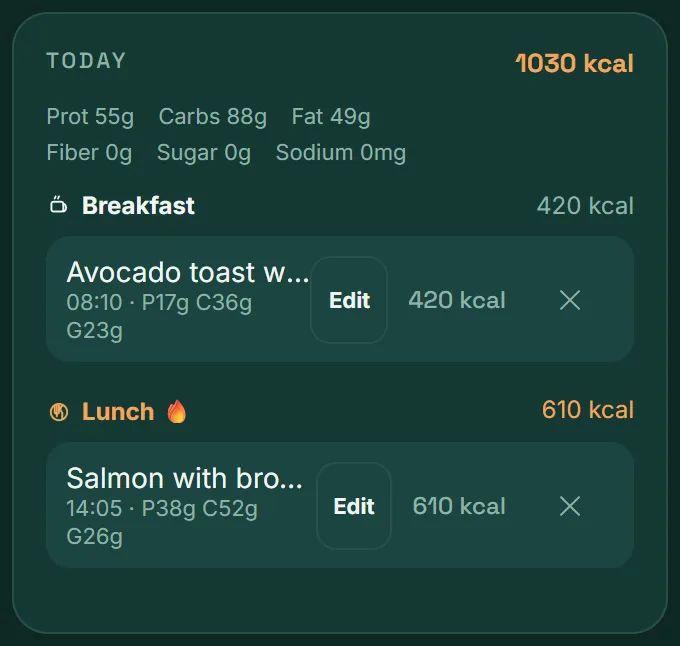
Below the form is the Today list: total calories, macronutrients and each meal grouped by type.
- To correct: tap Edit next to the meal.
- To delete: tap the ✕.
- The flame (🔥) marks the meal type with the most calories that day.
Another day
To add or correct a meal from an earlier day, open Calendar, tap the day and use + Add meal.
Where you see the result
In Today, your calories against your goal and the day’s nutrients. In Nutrition, how your macronutrients and micronutrients have gone over the last 30 days.
Frequently asked questions
Do I have to pay to log meals?
No. Logging meals is free, and so are barcodes, personalized meals and your history. VitaLinks Plus adds AI estimates with nothing to set up, including calories from a photo.
How accurate are the calories?
It depends on the source. Scanned products use the manufacturer’s data. AI estimates are approximate: good for understanding your habits, not for measuring to the gram. They are not medical advice.
Estimate asks me for an API key
It means the food isn’t in your history or in the shared food bank, so an AI estimate is needed. You can type the calories by hand, use VitaLinks Plus in the mobile app, or add your own API key in Settings.
I logged a meal under the wrong type
Delete it with the ✕ and add it again under the right type. As you type the name it will show up in the suggestions with its values, so it only takes a moment.