 VitaLinks
Guide › Activity and exercise
Activity and exercise
It doesn’t have to be intense. A walk, a yoga class or a weights session: it all counts, and writing it down takes seconds.
1. Log an activity
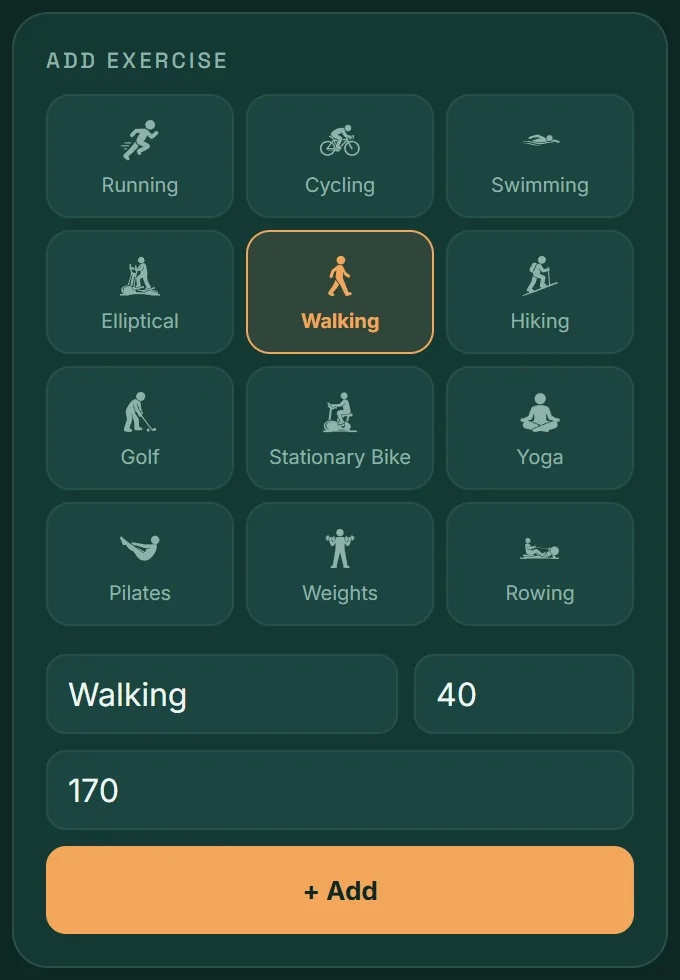
- Open the Exercise tab.
- Tap the icon for your activity: running, cycling, swimming, elliptical, walking, hiking, golf, stationary bike, yoga, pilates, weights or rowing.
- Not on the list? Type any name you like into Activity: “dancing”, “padel”, “gardening”.
- Enter the minutes in min.
- If you know them, enter the calories in kcal burned (optional).
- Tap + Add.
The app remembers. When you type an activity you’ve logged before, it shows up in the suggestions. Tap it and you won’t have to type it all out.
2. Calories burned
They’re optional. VitaLinks doesn’t calculate them for you: enter the figure from your watch, the gym machine or your training app. If you don’t have one, leave the field empty.
What counts toward your daily goal is the minutes. Calories are added up separately, in the Burned figure on the Today screen.
3. Your list for the day
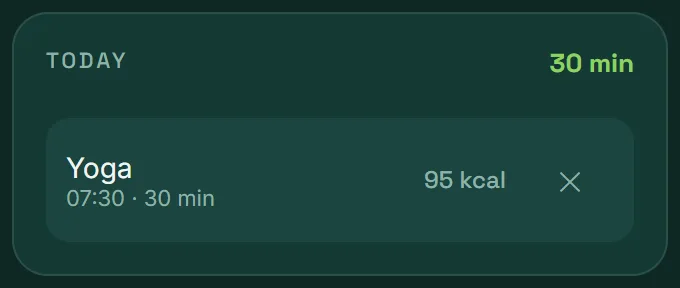
Below the form is the Today list, with total minutes and each activity with its time.
- To delete: tap the ✕ next to the activity.
- To correct: delete it and add it again with the right details.
Another day
To log exercise for an earlier day, open Calendar, tap the day and use + Add exercise. You can set the time there too.
4. Automatic steps and workouts
In the mobile app, VitaLinks can bring in your steps and workouts from Health Connect (Android) or Apple Health (iPhone), without you logging anything.
- Steps: they appear in a card at the top of the Exercise tab. If you haven’t connected yet, the button to do so is right there.
- Workouts: the ones your watch or sports app records land in the day’s list with a label showing where they came from.
How to connect it, step by step: Connected health.
5. Where you see the result
- In Today: the day’s minutes against your goal, and calories burned.
- In Progress: a chart of your exercise minutes over the last 7, 14 or 30 days.
- In Calendar: what you did each day.
Change your exercise goal in Settings → Daily goals → Exercise (min).
Frequently asked questions
Does walking count as exercise?
Yes. Choose Walking and enter the minutes. If you connect your steps in the mobile app, you’ll also see them appear by themselves each day.
I deleted an imported workout. Will it come back?
No. If you delete a workout that came from Health Connect or Apple Health, VitaLinks remembers and doesn’t import it again.
Does VitaLinks calculate the calories I burn?
No. The field is optional and you fill it in with the figure from your watch or machine. That way we don’t show a made-up number.
Can I change an exercise I’ve already saved?
Not for now: delete it with the ✕ and add it again. The app suggests it as you type the name, so it’s quick.